Category: ezparser

  • Unicode Escape Sequence: \uXXXX Syntax, Surrogates & Fixes

    Unicode Escape Sequence: \uXXXX Syntax, Surrogates & Fixes

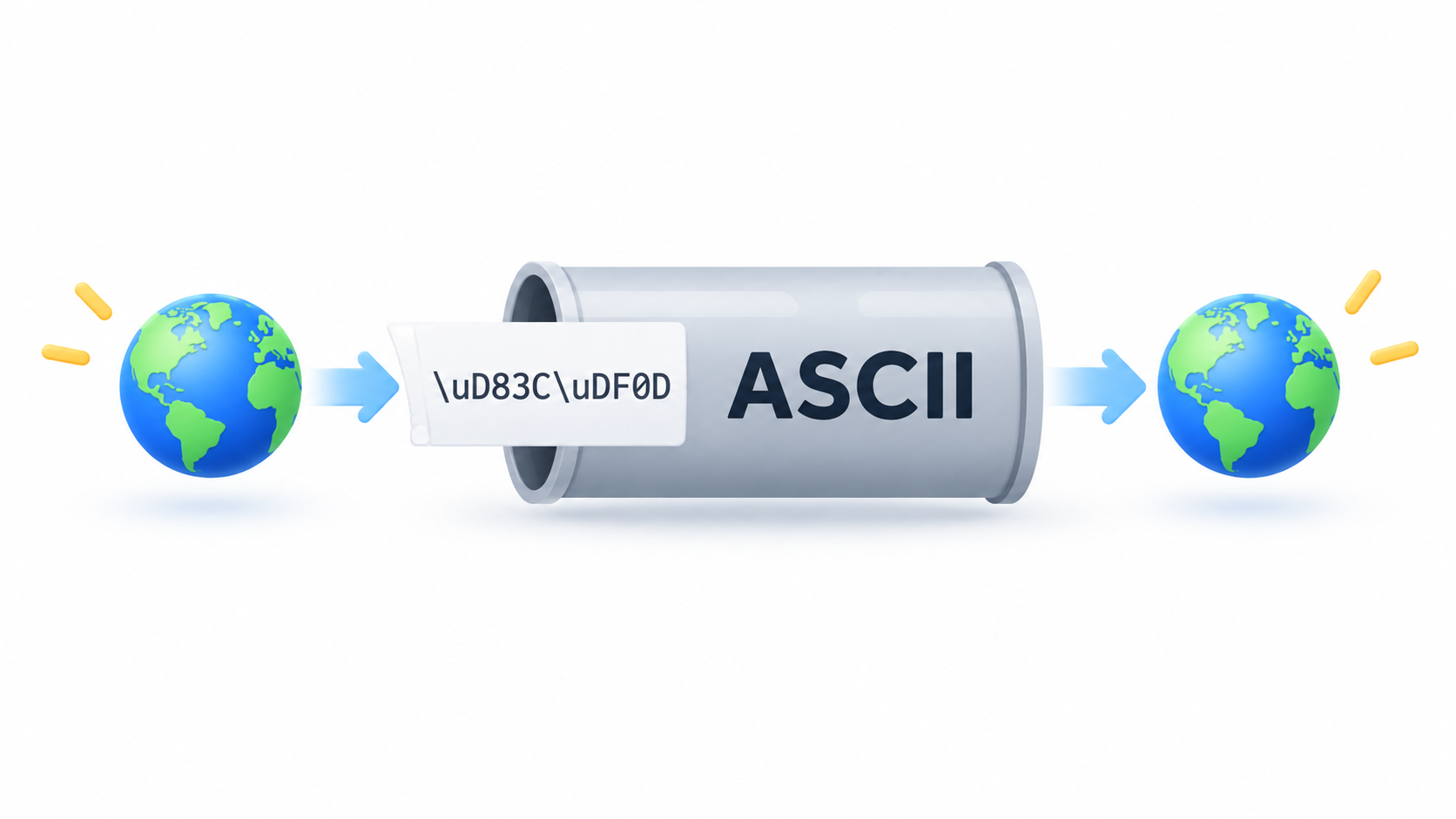
    Header: ASCII-only notation carrying Unicode characters across systems

    A Unicode escape sequence is an ASCII-only way to write a Unicode character — usually \uXXXX, where XXXX is the character’s hexadecimal code point. Java and JSON require four hex digits, JavaScript adds \u{...} and \p{...}, HTML uses &#xhhhh;, and URLs percent-encode UTF-8 bytes as %XX.

    What Is a Unicode Escape Sequence?

    A Unicode escape sequence is a notation that writes any Unicode character using only ASCII characters, so the text survives tools and protocols that never learned about anything beyond ASCII. The most common form is \uXXXX, where XXXX is four hexadecimal digits giving either a code point or, in UTF-16-based languages, the 16-bit code unit at that value.

    Unicode itself identifies characters with U+ notation: U+0000 is NUL, U+001B is the escape character, U+FFFF is the last code point in the Basic Multilingual Plane, and U+1F600 is 😀. Specifications, documentation, and error messages all use the U+XXXX form to name a character; \uXXXX is how that same character gets written inside source code, string literals, and wire formats.

    The scale behind that notation is large. According to Wikipedia’s list of Unicode characters, Unicode 18.0 assigns 310,351 characters with code points across 175 modern and historical scripts, plus multiple symbol sets. No single page can enumerate them, which is exactly why a compact escape notation exists.

    Unicode Escape vs. Property Escape vs. HTML Character Reference vs. Percent-Encoding

    Four notations look alike but solve different problems. \uXXXX — and JavaScript’s \u{...} — represent a code point or UTF-16 code unit inside a string or source file. \p{...} and \P{...} are Unicode property escapes, which per MDN match a set of characters by Unicode property and are only supported in Unicode-aware mode; outside that mode, \p is merely an identity escape for the letter p.

    HTML and XML numeric character references get resolved by the markup parser, not by a string parser. Wikipedia describes the format as &#nnnn; for decimal code points, &#xhhhh; for hexadecimal, and &name; for a predefined entity name. URL percent-encoding is a fourth system again: %XX encodes bytes, not characters.

    Here’s the one-line rule: read the prefix. \u means a code-point escape, \p means a property class, &#x means a markup character reference, and % means percent-encoded bytes.
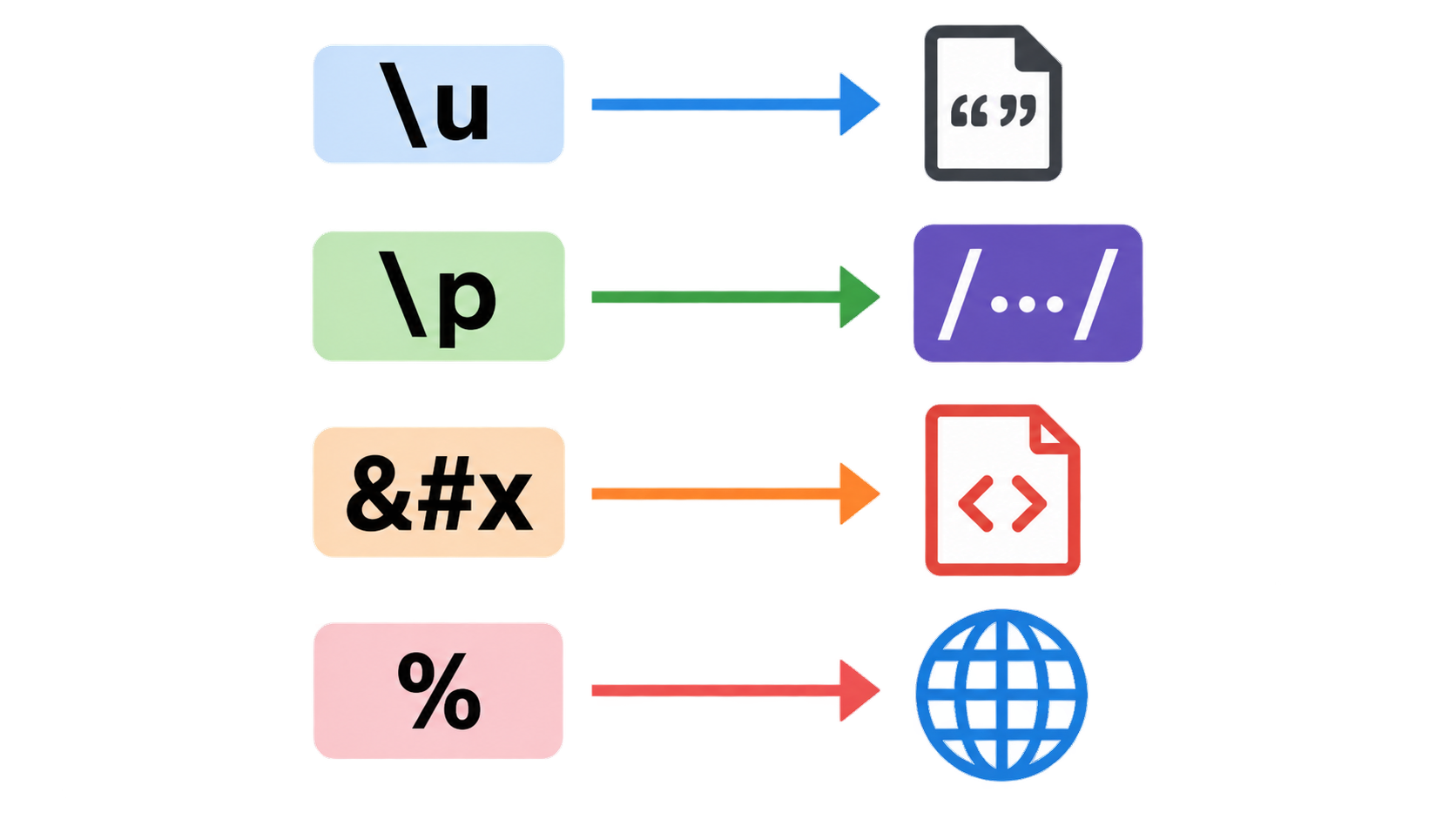
    Four prefixes pointing to four different interpreters

    Why Escapes Exist: ASCII-Only Representation

    The purpose is stated directly in the Java Language Specification (Java SE 7, §3.3): Unicode escapes let a program include any Unicode character “using only ASCII characters.” ASCII-only is the lowest common denominator that compilers, JSON parsers, log pipelines, configuration files, and older protocols all handle.

    With 310,351 assigned characters in Unicode 18.0, no toolchain can be expected to carry every character natively. A toolchain can reasonably be expected to carry backslash, u, and hexadecimal digits — so those characters become the transport layer for everything else.

    How to Write \uXXXX in Java, JavaScript, JSON, HTML and URLs

    No reference page on the search results lays the same character side by side across all five contexts. The table below does that, using é (U+00E9, one code unit) and 😀 (U+1F600, a surrogate pair) as the test characters.

    Context Form é (U+00E9) 😀 (U+1F600)
    Java source / string literal \uXXXX, exactly four hex digits "\u00e9" "\uD83D\uDE00"
    JavaScript string \uXXXX for BMP, \u{...} for any code point "\u00e9" or "\u{e9}" "\u{1F600}"
    JavaScript regex \p{...} / \P{...} — a property class, not a character \p{Letter} not applicable
    JSON string \uXXXX only "\u00e9" "\uD83D\uDE00"
    HTML / XML &#xhhhh;, &#nnnn;, &name; é or é 😀
    URL %XX octets of UTF-8 one or more octets four octets (surrogate pair)

    Java Source: Escapes Are Processed Before Tokenization

    JLS §3.3 defines three lexical translation steps applied in order: Unicode escapes are translated first, line terminators are recognized second, and input elements and tokens are formed third. Because escape processing happens before tokenization, the character an escape produces does not participate in further escapes.

    The canonical example: the raw input \u005cu005a yields the six characters \ u 0 0 5 a, not the character Z. The escaped backslash is not reinterpreted as the start of a second escape. Two related rules matter in practice: the u marker may be repeated (\uuuu0041 is legal), and a backslash can only begin an escape when the number of contiguous backslashes immediately before it is even.

    JavaScript: \uXXXX, \u{…} and \p{…}

    \uXXXX in JavaScript covers the Basic Multilingual Plane; \u{...} is used for code points above U+FFFF. \p{...} and \P{...} are a different construct — Unicode property escapes for regular expressions, with \P building a complement class instead of a single character.

    According to MDN, property escapes have been Baseline widely available across browsers since July 2020, and with the v flag \p can match finite-length strings, which is useful for emoji sequences made of multiple code points.

    JSON: What JSON.stringify Actually Emits

    JSON string escaping uses \uXXXX. The failure mode is not in the format but in the serializer: JSON.stringify emits \u0000 and lone surrogates verbatim and performs no validation of whether a downstream store will accept them.

    That is the step where a bad value escapes memory and reaches the database. The serializer’s job ends at producing valid JSON text; whether the JSON text is storable in a particular column is a separate question that the serializer never asks.

    HTML &#xhhhh; and URL %XX Are Not \uXXXX

    An HTML numeric character reference is read by the markup parser. So é and é are the same character to a browser, but mean nothing to a JavaScript string parser. If you need to go the other way and resolve a page of &#xhhhh; and &name; references back to text, an HTML entity decoder does that at the markup layer. Named entity references cover only a limited, predefined set of names.

    URLs take a different route entirely. MDN’s encodeURI() reference explains that the function replaces characters with one, two, three, or four escape sequences representing the UTF-8 encoding of the character, and that four sequences appear only for characters composed of two surrogate units. Because percent-encoding works on bytes rather than code points, one character can become several %XX groups.

    Why Do Emoji Need Two \uXXXX Escapes? Surrogate Pairs Explained

    A character inside the Basic Multilingual Plane corresponds to one escape. A character above U+FFFF is represented in UTF-16 as a pair of 16-bit code units, so it takes two consecutive escapes to write one character.

    JLS §3.3 states this as a rule rather than an edge case: representing supplementary characters requires two consecutive Unicode escapes. The string literal rules in the same specification make the split explicit — one escape sequence for characters in the range U+0000 to U+FFFF, two escape sequences for the UTF-16 surrogate code units of characters in the range U+010000 to U+10FFFF.

    The worked example is 😀. Its code point is U+1F600, and in UTF-16 it is written as \uD83D\uDE00 — a high surrogate from U+D800–U+DBFF followed by a low surrogate from U+DC00–U+DFFF. That’s two escapes for one character, which is why length counts, substring operations, and truncation behave in ways that surprise anyone who assumes one escape equals one character.
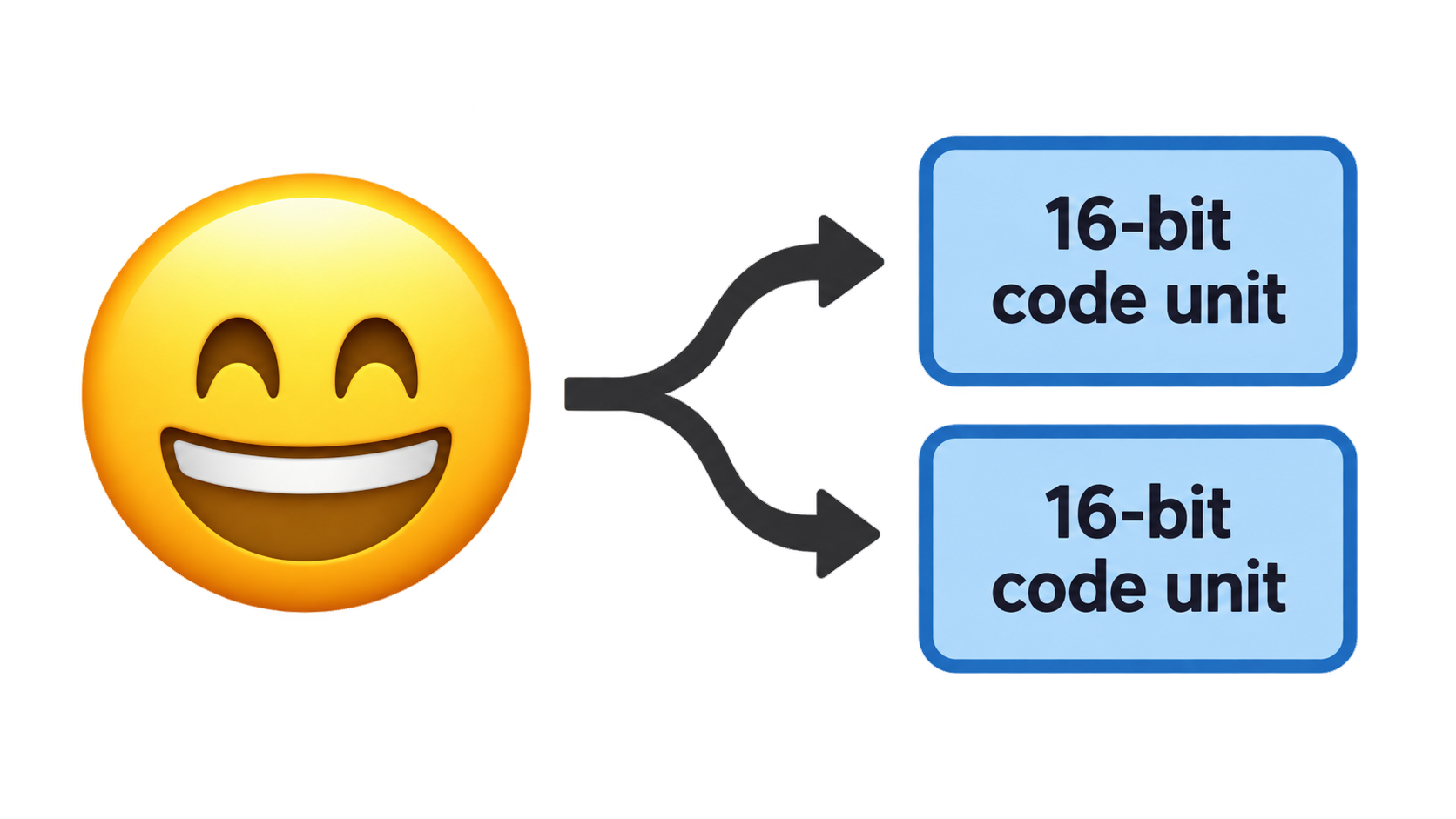
    One emoji code point splitting into a high and low surrogate pair

    BMP vs. Supplementary Characters: One Escape or Two

    The dividing line is U+FFFF. Characters from U+0000 to U+FFFF need one \uXXXX escape, because four hexadecimal digits cannot express anything larger. Characters from U+010000 to U+10FFFF need two, because each \uXXXX escape writes exactly one 16-bit code unit.

    This also explains why Java character literals cannot hold supplementary characters at all — the specification limits a char literal to values from \u0000 to \uffff, so a supplementary character must be written as a surrogate pair in a char sequence or as an integer, depending on the API.

    What a Lone Surrogate Actually Is

    A lone, or unpaired, surrogate is one half of an emoji with the other half missing. It is not a character. It shows up when a surrogate pair is truncated, or when arbitrary bytes are decoded as UTF-16.

    Lone surrogates fail loudly in several places. MDN notes that encodeURI() throws a URIError when it encounters a surrogate that is not part of a high-low pair, and that String.prototype.toWellFormed() can replace lone surrogates with the Unicode replacement character U+FFFD, while String.prototype.isWellFormed() can check for them. PostgreSQL jsonb rejects them outright, as the next section shows.

    One consequence deserves emphasis: paired surrogates must be preserved exactly. A sanitizer that treats every high or low surrogate code unit as an illegal character will delete legitimate emoji, which is a hidden bug in a lot of cleanup logic.

    How to Fix “unsupported Unicode escape sequence” (SQLSTATE 22P05)

    This error is the reason many people arrive at this topic at all. Roughly half the results surfaced for this query are issue reports opened in the September 11–24, 2026 window that exist because of this specific database error, yet none of the reference pages explain it. If you are holding a stack trace, the definition of an escape sequence is not the useful part — the fix is.

    What PostgreSQL Rejects and What It Accepts

    The boundary is narrow, and it is worth proving with a runnable statement. In standard-conforming SQL strings, \\ is a literal backslash, so the JSON text below contains a real \uXXXX escape:

    select '{"t":"a\\u0000b"}'::jsonb;        -- ERROR: unsupported Unicode escape sequence (22P05)
    select '{"t":"a\\ud800b"}'::jsonb;        -- ERROR: unsupported Unicode escape sequence (22P05)
    select '{"t":"\\ud83d\\ude00"}'::jsonb;   -- OK
    select '{"t":"\\u0001"}'::jsonb;          -- OK
    

    According to GitHub issue #1493 in THU-MAIC/OpenMAIC, PostgreSQL rejects exactly two escape families that serializers emit verbatim: \u0000 (a NUL byte) and lone UTF-16 surrogates such as \ud800. It accepts \u0001, \u007f, and other control characters, and it accepts paired surrogates such as \ud83d\ude00. The distinction is NUL and unpaired surrogates — not control characters in general, and not escaping as such.
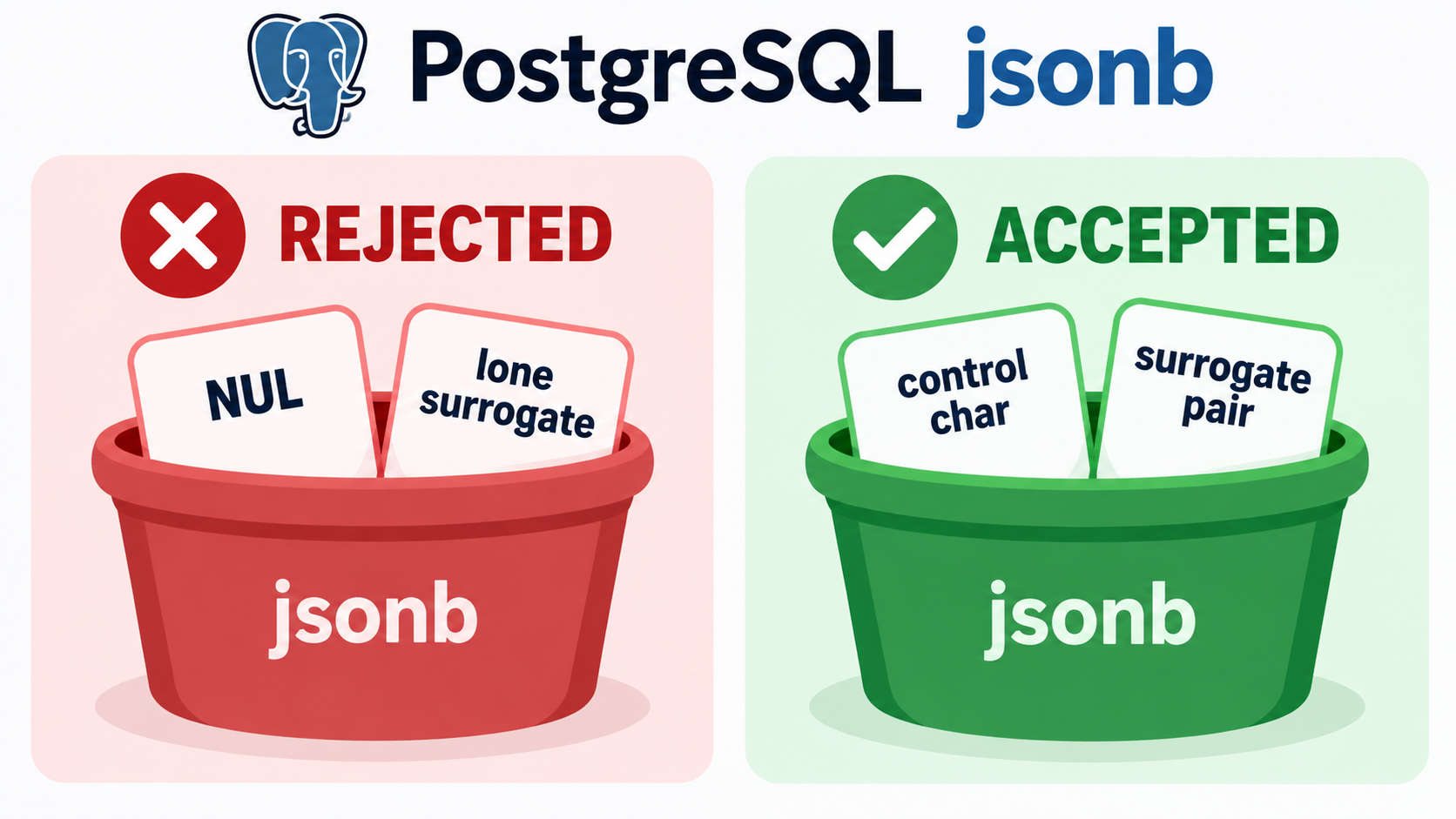
    Two buckets: what PostgreSQL jsonb rejects versus accepts

    Sanitizing Before the Write, Not After Serialization

    The fix that issue #1493 converged on is to sanitize string values while serializing, using the replacer argument of JSON.stringify, so the check runs against the in-memory string rather than against already-serialized text. The replacer walks code units: drop 0x0000; when a high surrogate is followed by a low surrogate, keep the pair and skip past it; drop any remaining lone high or lone low surrogate.

    The issue records a second, harder-won lesson: do not run a regular expression over the serialized JSON. A regex cannot distinguish a real lone-surrogate escape from the literal characters \ and ud800 appearing in content, and stripping those produces invalid JSON — the issue’s author reports hitting SQLSTATE 22P02 that way, which is a worse failure than the original error.

    Two variants of the same fix are noted in the issue. \u0000 can be replaced with U+FFFD instead of dropped if you’d rather keep a placeholder. And the sanitizer must not touch paired surrogate code units, since stripping them destroys valid emoji.

    Binary content needs separate handling. According to GitHub issue #403 in LabsConnected/litlabs-website, an .ico or .jpeg asset read as UTF-8 produced lone surrogates, and the whole deployment failed at the file-write step with unsupported Unicode escape sequence. The issue’s suggested direction is to base64-encode binary assets before the write, reject or sanitize non-text-safe content with a per-file error naming the offending path, and add a regression test. For URL paths, MDN’s recommendation is to pass the string through String.prototype.toWellFormed() — or check isWellFormed() first — before calling encodeURI().
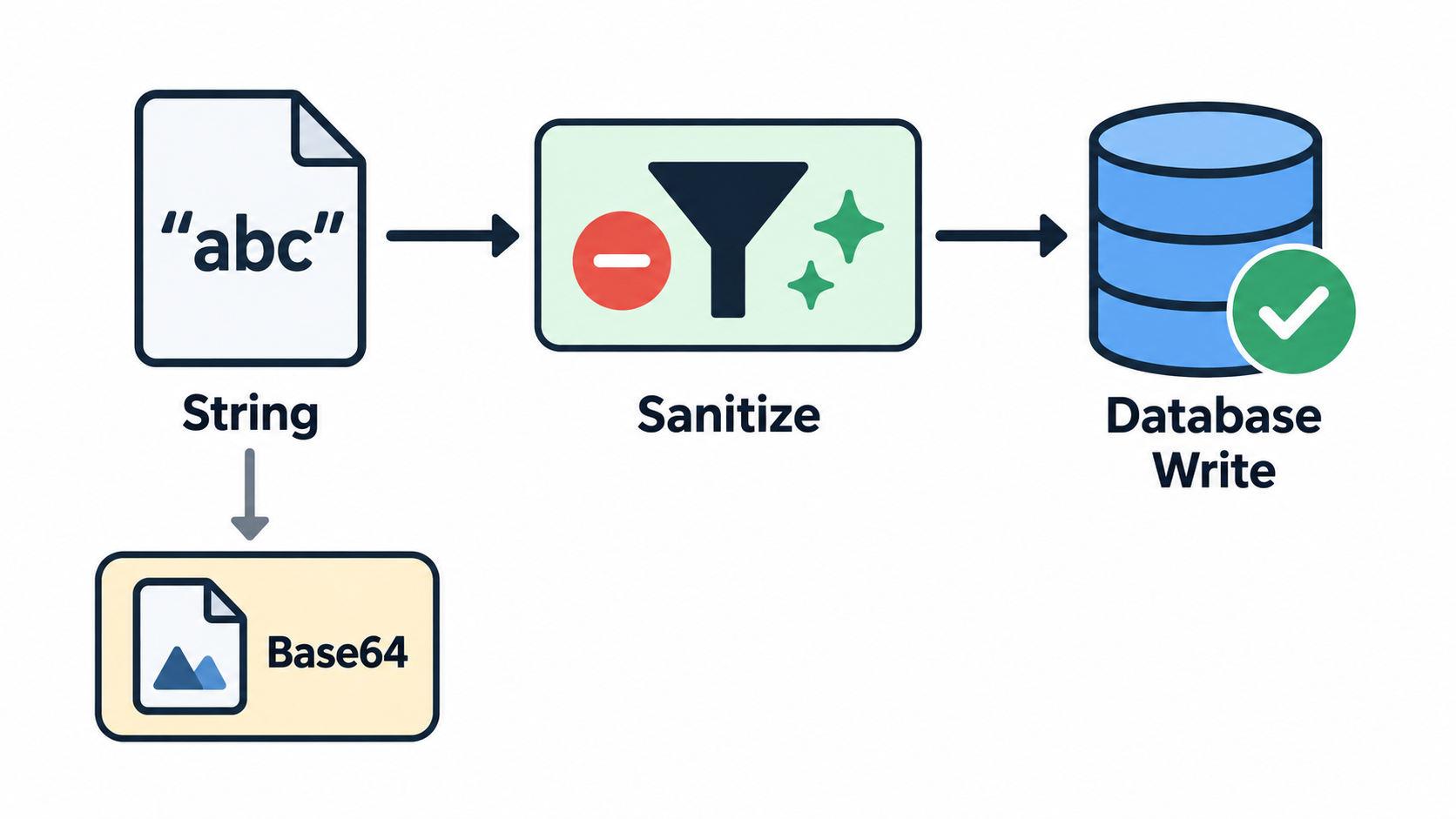
    Three-step sanitize-before-write flow: drop NUL, keep pairs, encode binary

    The impact justifies the guard rails. Issue #1493 reports that a single NUL character or lone surrogate aborts an entire session run, destroying 3–4 already-generated lessons per occurrence during batch course generation on PostgreSQL 16.11 with Node v24.18.1. Issue #403 reports that one bad binary file fails an entire deployment because there is no per-file guard or fallback. Per-record and per-file checks with a fallback path limit the blast radius.

    When a Failed Record Cannot Even Be Logged as Failed

    There is a second-order failure mode that few write-ups mention: the system cannot even record that it failed. According to GitHub issue #901 in readur/readur, the null-byte guardrail added in PR #308 / v2.6.0 does not cover every database write path. On the current latest image, PDFs whose OCR text contains \u0000 still fail, and the follow-up attempt to insert into failed_documents was itself rejected — this time by a check_failure_reason constraint.

    The result is a document that is permanently stuck. It cannot be ingested, it cannot be logged as failed, and it therefore never appears in the “Failed OCR” UI, so the retry function cannot pick it up. A prior database inspection in the same issue showed 105 rows stuck in pending in ocr_queue, and manually resetting statuses did not help because ingestion fails before a queue entry is created.

    The issue’s expected behavior is a reasonable template for any pipeline that stores escape-bearing text: sanitize before any database write, including the failure-logging path; fall back to a generic failure reason instead of raising a constraint violation that masks the original error; and always persist failed records so they remain visible and retryable.

    Reading Escapes You Didn’t Write: Literal \u00e9 Text vs. Mojibake

    Not everyone arriving at this topic is writing escapes. Some are staring at a literal \u00e9 in a dialog box, or at café in a string, and trying to work out whether the escape was never interpreted or interpreted one time too many. Pasting the escape into a Unicode escape decoder confirms what the four hex digits name; what follows is about why the surrounding text went wrong.

    Symptom Likely cause One-line check
    \u00e9 appears as literal text to a human The layer rendering it does not interpret \u, or the text was escaped for one context and injected into another, such as JavaScript-escaped text placed into an HTML attribute Does the layer that displays the string know how to interpret a \u prefix?
    café instead of café A string that was already decoded got decoded again with the wrong encoding — typically UTF-8 bytes read as latin-1 Compare the character count against the expected value and look for à or  where accented letters belong
    The escape resolves correctly but the non-ASCII text beside it is destroyed A codec that expects bytes was applied to a str Check what input type the codec expects before calling it

    Two recent reports map cleanly onto the first and third rows. According to GitHub issue #17357 in mautic/mautic, a confirmation cancel button label stored through a data attribute renders as literal \uXXXX text in the Russian locale instead of the localized word; the proposed fix is to render the label with HTML-attribute escaping rather than JavaScript escaping, and to read it in JavaScript instead of passing HTML content through a data attribute.

    According to GitHub issue #53 in colinta/SublimeStringEncode, a Unicode Escape command built on codecs.decode(text, 'unicode-escape') corrupts every non-ASCII character in the selection, because the codec takes bytes and the plugin’s str is first encoded to UTF-8 and then decoded as latin-1. Selecting café produces café, and selecting \u00e9 é produces é é — the escape decodes correctly while the literal é next to it is destroyed.

    The reusable rule is to identify what the current layer expects before changing anything. Confirm whether that layer consumes escape text or already-decoded characters, then fix that layer, rather than re-encoding repeatedly at the wrong level.

    Which Edition and Version Should You Cite?

    Version context across the current search results is thin and in places self-contradictory. The only Java source surfaced for this topic is the Java SE 7 specification rather than the current edition. Wikipedia’s character list states that Unicode 18.0 assigns 310,351 characters, yet elsewhere on the same page cites Unicode 17.0 for the number of characters classified as Latin script — two different versions in one article. Only the MDN pages display current revision dates, both last modified on September 2, 2026.

    The practical rule is to name the version on every citation rather than treating any edition as “the current rule.” Where a rule has been stable across editions — such as the processing order of Unicode escapes and the non-recursive expansion rule, both of which come from JLS §3.3 and are stated in the same terms in the Java SE 7 edition cited here — say so explicitly and attribute the source. That way a reader is not misled by an older edition’s wording.

    Character counts must be version-bound for the same reason. The figure of 310,351 assigned characters across 175 scripts is a Unicode 18.0 figure and changes with each version of the standard, so it should not be mixed with counts drawn from an earlier release.

    Conclusion

    A Unicode escape sequence is just a notation for writing any Unicode character in ASCII — but the notation takes different forms in Java, JavaScript, JSON, HTML, and URLs, and the edge cases are where it breaks. Surrogate pairs and U+0000 are the two boundaries that cause most real incidents. Start by identifying which of the four escape families you are holding, using the cross-context table above. Before any database write, sanitize at the in-memory string level with a JSON.stringify replacer: drop \u0000, keep paired surrogates intact, and base64-encode binary assets. When you see literal \uXXXX text or café, determine whether the string was never interpreted or interpreted twice, then fix that specific layer.

    FAQ

    What is the difference between a Unicode escape sequence, an HTML numeric character reference (&#xhhhh;), and URL percent-encoding (%XX)?

    They encode different things. \uXXXX encodes a code point, or a UTF-16 code unit in languages that use UTF-16. &#xhhhh; is a markup character reference resolved by an HTML or XML parser. %XX encodes UTF-8 bytes, so one non-ASCII character can become several %XX groups. Reading the prefix — \u, \p, &#x, or % — tells you which system must interpret the text.

    Why do emoji and other supplementary characters need two \uXXXX escapes instead of one?

    One \uXXXX escape writes a single UTF-16 code unit, and its four hexadecimal digits cannot express anything above U+FFFF. Characters above that boundary are stored in UTF-16 as a high surrogate plus a low surrogate, so they need two consecutive escapes. U+1F600 is written \uD83D\uDE00: two escapes, one character. Delete either half and you have a lone surrogate.

    Why does PostgreSQL reject my data with “unsupported Unicode escape sequence”?

    The error carries SQLSTATE 22P05, and it triggers on a payload containing \u0000 (NUL) or a lone surrogate such as \ud800. It does not reject all control characters — \u0001 and \u007f write successfully, and a paired surrogate like \ud83d\ude00 is accepted. The usual source is JSON.stringify emitting those escapes verbatim, so sanitize the in-memory string before the write. To see which escapes a failing payload actually contains, run it through an online Unicode decoder first.

    How many hexadecimal digits does \uXXXX require, and can extra u characters be added?

    The standard form is \u followed by exactly four hexadecimal digits. Java permits a repeated u marker, so \uuuu0041 is legal, but the digit count is unchanged. Expansion is not recursive: \u005cu005a produces the six literal characters \ u 0 0 5 a, not Z. The \u{...} form belongs to JavaScript’s supplementary-character syntax, not to an extended \uXXXX.

    What is the escape character U+001B, and why is this notation called “escape”?

    U+001B is ASCII 27 in decimal, Unicode U+001B, and the Ctrl+[ combination — the character the Esc key produces. Wikipedia’s article on the Esc key attributes the idea of putting that functionality into a character-encoding convention, and calling it escape, to Bob Bemer’s contributions to ASCII around 1960. Terminals used it to begin control sequences; \u001b today is that control character itself.
  • Token Parser: What It Is and How to Build One

    Token Parser: What It Is and How to Build One

    Header: one name, four different parsers

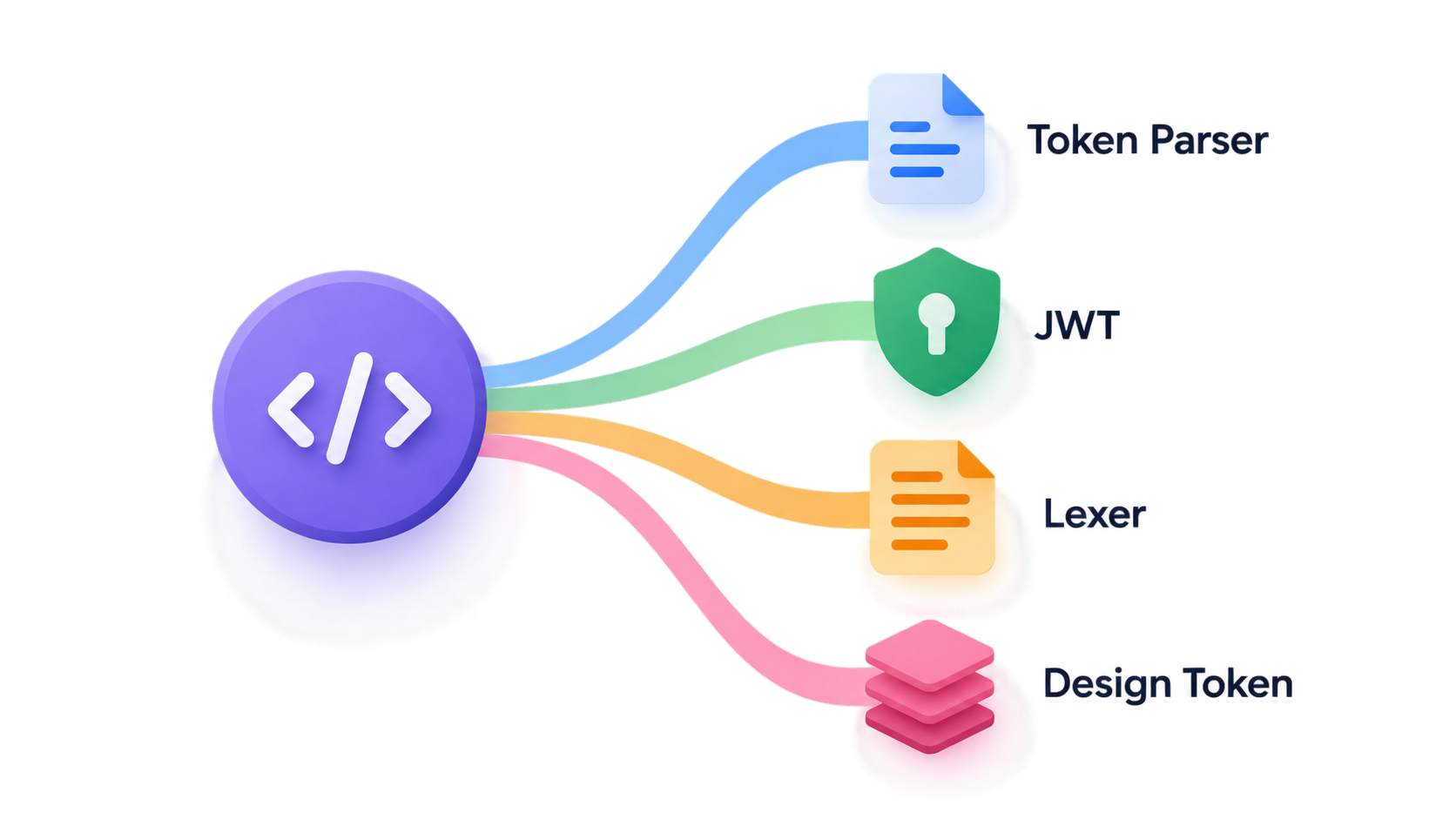
    A token parser turns an input string into discrete tokens and interprets them: lexical tokens in source code, Base64url segments in a JWT, placeholders like {SEQ:X} in a document template, or design tokens in a build pipeline. Which parser you need depends on the format you’re decoding — and the term still spans four unrelated meanings that no single page explains.

    What Is a Token Parser?

    A token parser is the component that takes a raw string and produces a sequence of typed, interpreted tokens. It answers three questions, in order: where does one meaningful unit end and the next begin, what kind of unit is it, and what does it mean once you know its type? Everything downstream — an authorization header, an abstract syntax tree, a generated document number, a compiled design system — inherits whatever the parser decided.

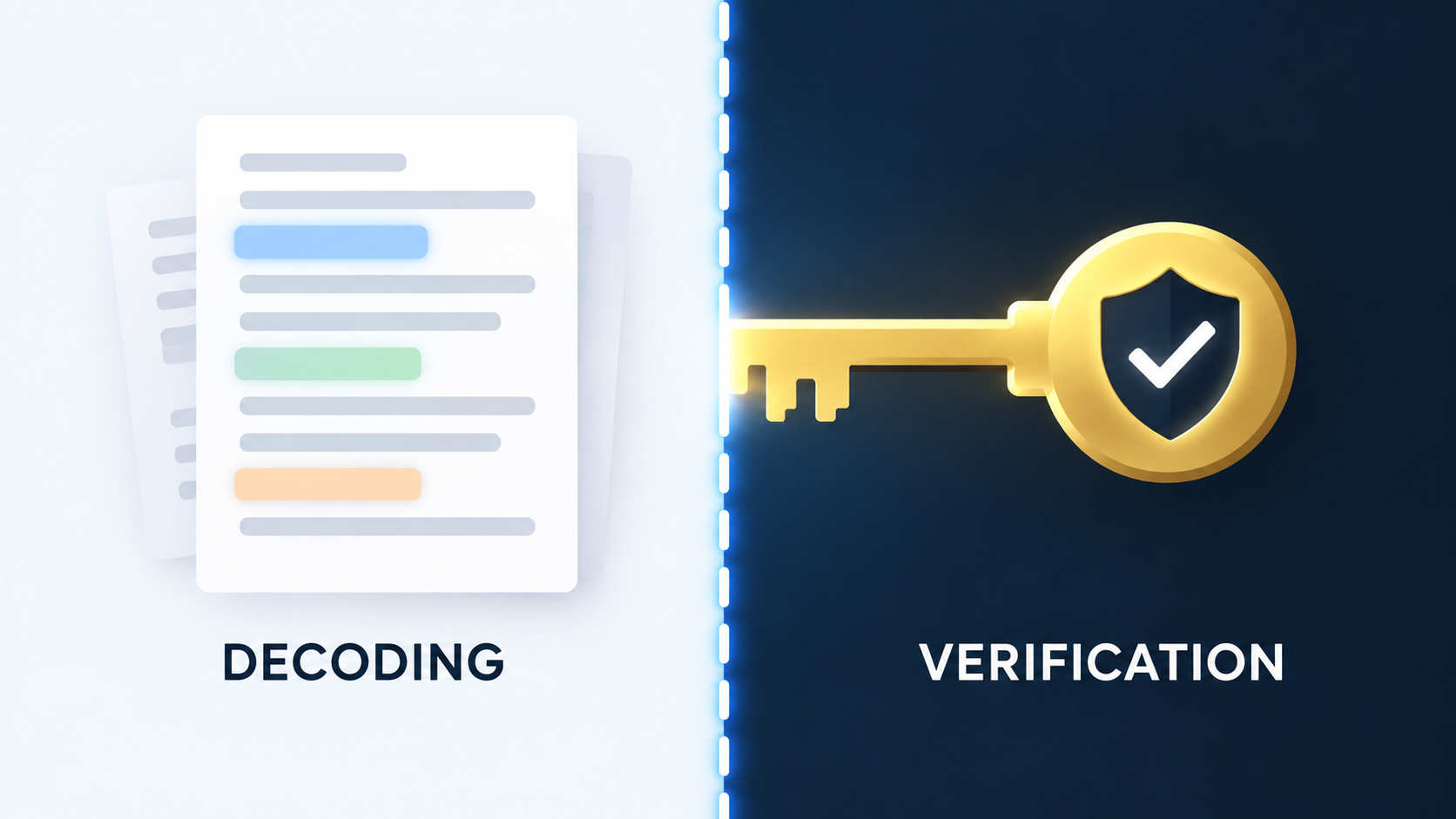
    That definition also marks the parser’s boundary. A token parser is not a validator, a verifier, or a serializer. Parsing ends where trust decisions begin. Decoding a JWT’s payload and confirming the token was signed by a party holding the private key are different operations, run by different code, with different failure modes. Conflating the two is the most common defect in this space.

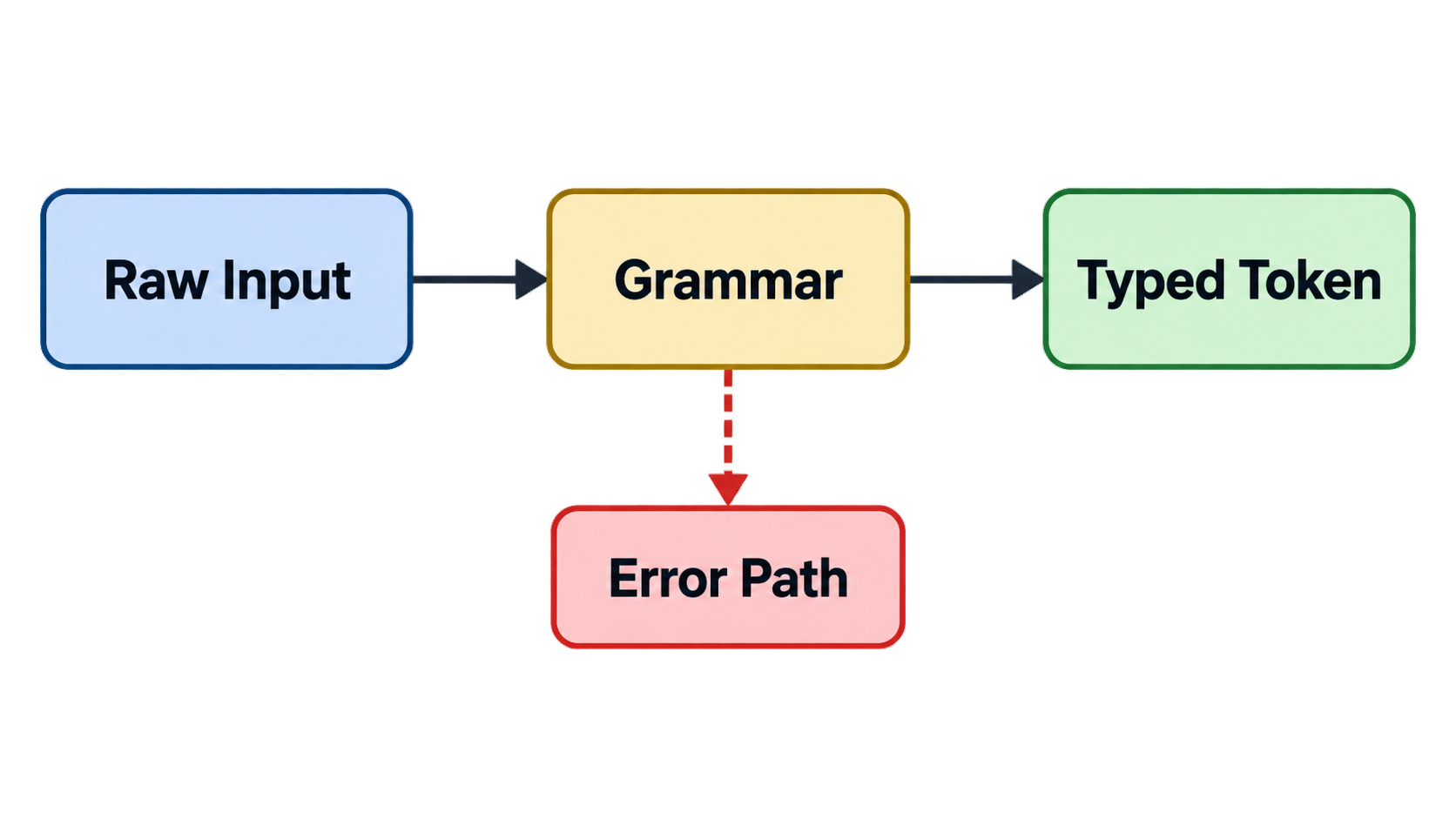
    The four variants in this guide share the same skeleton, even though they operate on completely unrelated formats:

    • A scanner or tokenizer that walks the input and segments it
    • A token grammar — a regex, a DFA, or a lookup registry — that decides which segment matches which token type
    • A token record carrying at minimum a type, the raw lexeme, an interpreted value, and a position for error reporting
    • An error path that defines what happens when the input does not match the grammar

    Shared skeleton of the four token parser variants

    That ambiguity is the real problem. Search for “token” today and you’ll find at least five meanings: a lexeme in source code, a Base64url segment inside a JWT, an OAuth access token presented in an Authorization header, a design token in a build pipeline, a template placeholder — and, in developer tooling, a counted unit of LLM consumption. The premise of the ezparser JWT parser, for example, is that “token” means a signed JSON credential. The premise of the plus-uno token-literal check is that “token” means a design-system value. Both are called token parsers. They don’t read the same thing.

    This matters because picking the wrong branch gives you a parser that compiles, runs, passes a smoke test, and reads the wrong object. Point a JWT-shaped parser at a design-token file and it won’t throw — it will simply extract nothing useful, or extract something plausible but wrong.

    Token parser vs. tokenizer vs. lexer: where the lines are

    These terms overlap, but they describe different stages. A tokenizer or lexer produces the token stream from a character string. A token parser consumes that stream and assigns structural meaning — grouping tokens into expressions, blocks, or records.

    In practice, plenty of codebases use the words interchangeably, and the distinction often collapses inside a single module. The useful rule: check what the library actually accepts and returns before assuming which term it means. If it takes a string and returns a list of typed units, the vocabulary is cosmetic. If it takes a string and returns a tree, it’s doing both jobs, and the naming isn’t worth arguing about.

    Quick glossary: token, lexeme, claim, Base64url, design token, placeholder

    • Token — a typed unit produced by parsing; its type, not its text, drives downstream behavior.
    • Lexeme — the raw substring a token was matched from, kept for error messages and round-tripping.
    • Claim — a name/value pair inside a JWT payload, such as iss, sub, or exp.
    • Base64url — a URL-safe Base64 variant that substitutes - for + and _ for /, and typically omits padding.
    • Design token — a named design value (color, dimension, typography, motion) held in a platform artifact and consumed by a build pipeline.
    • Placeholder — a bracketed token inside a template string, such as {BRANCH} or {SEQ:X}, replaced at generation time.

    Which Token Parser Do You Actually Need? A Decision Table

    The input in front of you determines which parser you should reach for. Find your input in the first column, then read across — the rest of this guide follows this table.

    Input you have Token meaning Output you want Parser type First thing to get right
    A three-part dotted string copied out of a browser or log JWT / OAuth security token Readable header and claims Base64url segment decoder + JSON deserializer Decode only — never verify, never trust for authorization
    Source code, a log line, or a configuration file Lexical token A token stream feeding a parser or AST Tokenizer / lexer Maximal munch and rule ordering
    A string containing {PREFIX} or {SEQ:X} Template placeholder token A substituted, unique output string Registry-driven substitution Fail loud on unknown tokens
    JSON, SCSS, or Kotlin artifacts holding colors, spacing, typography Design token Generated platform code Build-pipeline generator with a pinned source Pin the source commit and reproduce byte for byte

    Every row works on a different contract. The JWT row is inspection only — the output goes to a human debugging a login flow. The lexical row is a pipeline stage. The template row is a substitution engine where correctness means uniqueness, not readability. The design-token row is a code generator where correctness means diff size.

    None of the pages that currently rank for this term defines it or separates those four meanings. They’re either tool landing pages describing one branch in isolation, or GitHub issues that assume you already know which branch you’re on. The table above fills that gap.

    One-line rule: the format you are decoding picks the parser

    If you remember nothing else, remember this: the format you’re decoding picks the parser, not the other way around. You don’t choose a token parser and then go looking for something to feed it. Name the token format first, and the format dictates the grammar, the failure behavior, and where the parser has to stop.

    Token Parser for Security Tokens: How to Decode and Inspect a JWT

    The JWT parser is the most-searched branch of this topic, and the one where misuse causes the most damage. The procedure below is for inspection only. It’s meant for a debugger, a local script, or a CLI — never for a server-side authorization decision.

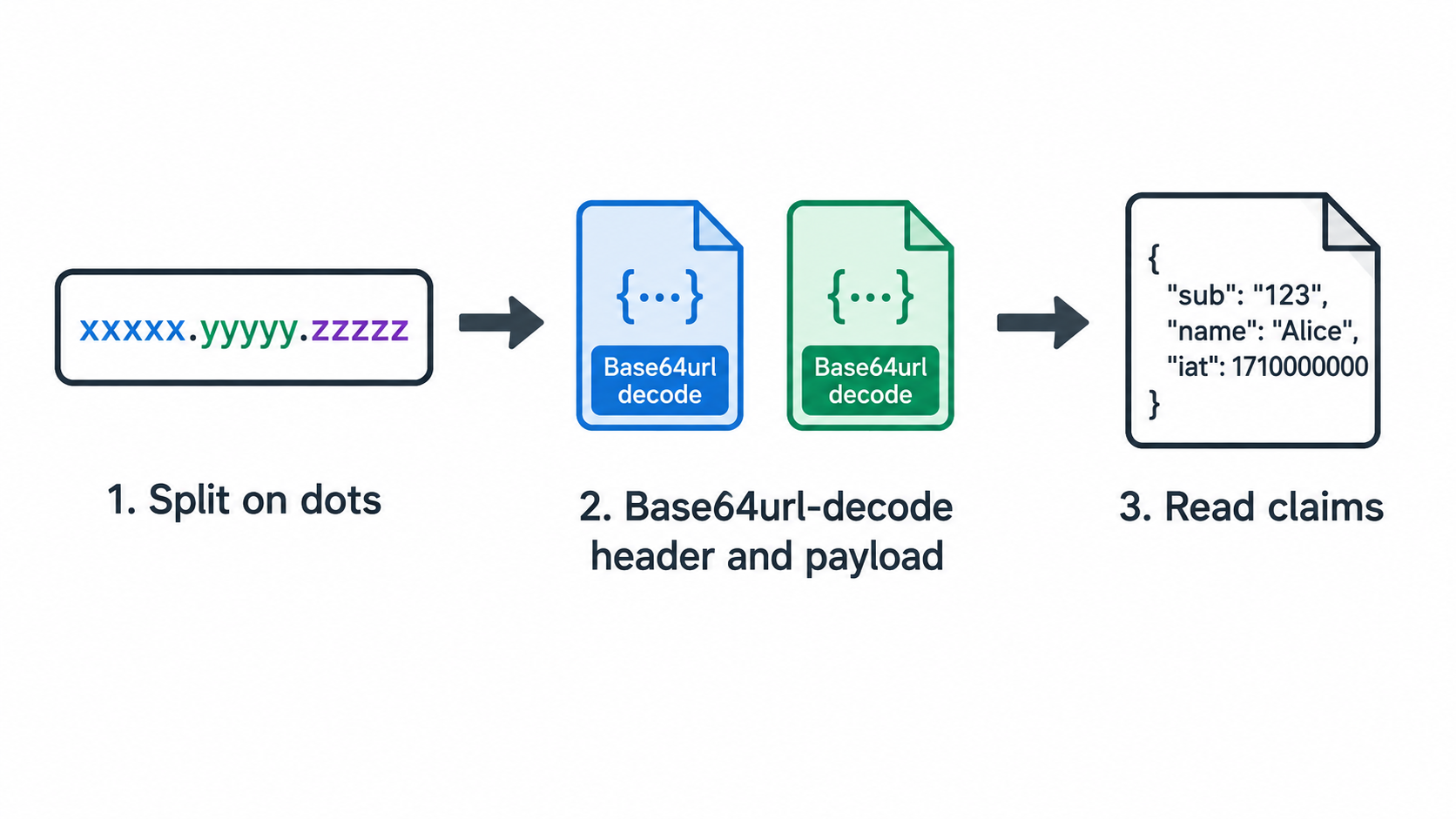
    Step 1 — split on the dots. RFC 7519 defines a compact JWT as three Base64url segments joined by periods: Header, Payload, and Signature. Splitting gives you three strings. Anything other than three is a malformed token.

    Step 2 — Base64url-decode the first two segments. Base64url substitutes - for + and _ for /, and the padding is usually stripped. A standard Base64 decoder will fail on a stripped segment unless you re-pad it to a multiple of four characters. This is the most common reason a naive decoder throws on a valid token.

    Step 3 — read the fields that matter. In the header, alg tells you which signing algorithm was declared, and typ usually reads JWT. In the payload, iss is the issuer, sub is the subject, aud is the intended audience, iat is issued-at, and exp is expiry — all timestamps in Unix seconds. Convert exp to a UTC time and compare it against the current clock; that answers “is this token stale?” without a round-trip to the issuer.

    Step 4 — treat the signature segment as opaque bytes. Without the HMAC secret or the RSA public key, the third segment tells you nothing. It’s a byte string whose only purpose is to be checked by code that holds the key.

    Step 5 — write the decoder. The following examples are explicitly decode-only.

    import base64, json, datetime
    
    def decode_segment(segment: str) -> dict:
        # Base64url: restore padding before decoding
        padded = segment + "=" * (-len(segment) % 4)
        raw = base64.urlsafe_b64decode(padded.encode("ascii"))
        return json.loads(raw.decode("utf-8"))
    
    def inspect(jwt: str) -> None:
        parts = jwt.split(".")
        if len(parts) != 3:
            raise ValueError("compact JWT must have exactly three segments")
        header, payload, _signature = parts  # signature is opaque here
        header = decode_segment(header)
        payload = decode_segment(payload)
    
        print("alg:", header.get("alg"), "typ:", header.get("typ"))
        for claim in ("iss", "sub", "aud", "iat", "exp"):
            print(f"{claim}: {payload.get(claim)}")
    
        if "exp" in payload:
            expiry = datetime.datetime.fromtimestamp(payload["exp"], datetime.timezone.utc)
            print("expires at (UTC):", expiry.isoformat())
            print("expired:", expiry < datetime.datetime.now(datetime.timezone.utc))
    

    The Node equivalent is shorter because the runtime already understands the encoding:

    // decode-only — this does not verify the signature
    function inspect(jwt) {
      const parts = jwt.split('.');
      if (parts.length !== 3) throw new Error('compact JWT must have exactly three segments');
    
      const [header, payload] = parts.map((segment) =>
        JSON.parse(Buffer.from(segment, 'base64url').toString('utf8'))
      );
    
      console.log('alg:', header.alg, 'typ:', header.typ);
      for (const claim of ['iss', 'sub', 'aud', 'iat', 'exp']) {
        console.log(claim, payload[claim]);
      }
      if (payload.exp) {
        const expiry = new Date(payload.exp * 1000);
        console.log('expires at (UTC):', expiry.toISOString());
        console.log('expired:', expiry < new Date());
      }
    }
    

    Step 6 — place the token in its OAuth context. In OAuth 2.0, an access token arrives in an Authorization: Bearer <access_token> header. The token_type value issued alongside the token is what tells a client how to present it — not an assumption baked into the calling code.

    Three-step JWT decode-and-inspect flow

    Splitting and Base64url-decoding the three segments

    The padding problem deserves its own note, because it produces confusing failures. Base64url encoding of a JSON object rarely lands on a multiple of four characters, and most producers strip the = padding rather than emit it. A decoder that expects padded input either throws or silently truncates. Re-padding with (-len(segment) % 4) characters — as in the Python example above — restores the input to a form the standard decoder will accept.

    The second trap is the alphabet. - and _ aren’t valid characters in standard Base64. A decoder that doesn’t switch alphabets will reject a perfectly valid segment. Python’s base64.urlsafe_b64decode and Node’s 'base64url' encoding handle this automatically; a hand-rolled decoder usually won’t.

    Reading exp, iss, aud and sub without a server round-trip

    Four claims carry most of the debugging value. exp tells you whether the token is still current. iss tells you which system minted it — the usual cause of a rejected token is that it came from a staging issuer when production was expected. aud tells you which API it was meant for, and a token minted for one audience will be correctly rejected by another. sub tells you who the token is about.

    All four can be read offline, with no key required. That’s the point: claims are informative, not authoritative. Anything a decoder can read, an attacker can write.

    Where a Token Parser Must Stop: Decoding Is Not Verification

    Decoding reverses Base64url and deserializes JSON. That’s the whole operation. Anyone can craft a token with any claims they like, sign nothing, and produce a string that decodes perfectly. Only signature verification with the HMAC secret or RSA public key establishes that the claims actually came from the issuer. A token parser that returns claims to a caller who then treats them as trusted isn’t misconfigured — it’s been asked to do something it can’t do.

    The boundary generalizes across credential formats. A SAML response decoder shows every field of an assertion without proving it came from the identity provider, and a cookie header parser shows what the browser sent without vouching for the session behind it. In each case, parsing makes claims readable; only verification makes them trustworthy.

    The boundary line between parsing and trust

    OAuth 2.0 makes that boundary explicit. RFC 6749 §5.1 requires both access_token and token_type in a successful token response, and states that token_type is case-insensitive — so Bearer, bearer, and BEARER are all valid. RFC 6749 §7.1 is the rule that gets skipped in practice: a client must not use an access token whose type it doesn’t understand.

    Reject a missing token_type instead of defaulting to Bearer

    The cortexfs issue #282 documents exactly this failure. In parse_oauth_token_response, validation used Option::is_some_and, which only rejects a present non-Bearer value. A response with no token_type field at all passed validation silently. Downstream, model_headers serialized every Credential::OAuth as Authorization: Bearer <access_token> — so an undeclared type got reinterpreted as Bearer by default.

    The shape of the fix generalizes well beyond one repository. Require the field to be present. Accept Bearer case-insensitively. Keep rejecting unsupported types such as mac. Update the success fixtures in the same change to include token_type: "Bearer". As the issue records, the expected production change was one existing predicate tightened in place, netting zero production lines of code — the fix removed an implicit assumption instead of adding an abstraction.

    Here’s the pattern to internalize: a validator that checks “if present, must be valid” is a weaker thing than one that checks “must be present and valid.” The first admits a missing field; the second doesn’t. When the consuming code has a fallback default, the first becomes a silent policy decision made by omission.

    Keep parser errors bounded and generic

    A token parser must never return its internals to a client. Offsets, grammar rule names, expected token types, partial parse states — that’s a map of the input format, and handing that map to an untrusted caller is a gift.

    The synchro issue #53 records this as audit finding C12, independently verified with a verdict of CONFIRMED at severity Low. The server returned token parser details in responses, and no existing test covered the behavior. The proposed fix is to return a bounded generic error instead of parser internals, with an acceptance criterion that a permanent test fails without the fix and passes with it. Detailed diagnostics belong in server-side logs behind a stable correlation ID — the client gets an opaque error and a handle, not a description of the grammar.

    Building a Lexical Token Parser (Tokenizer or Lexer)

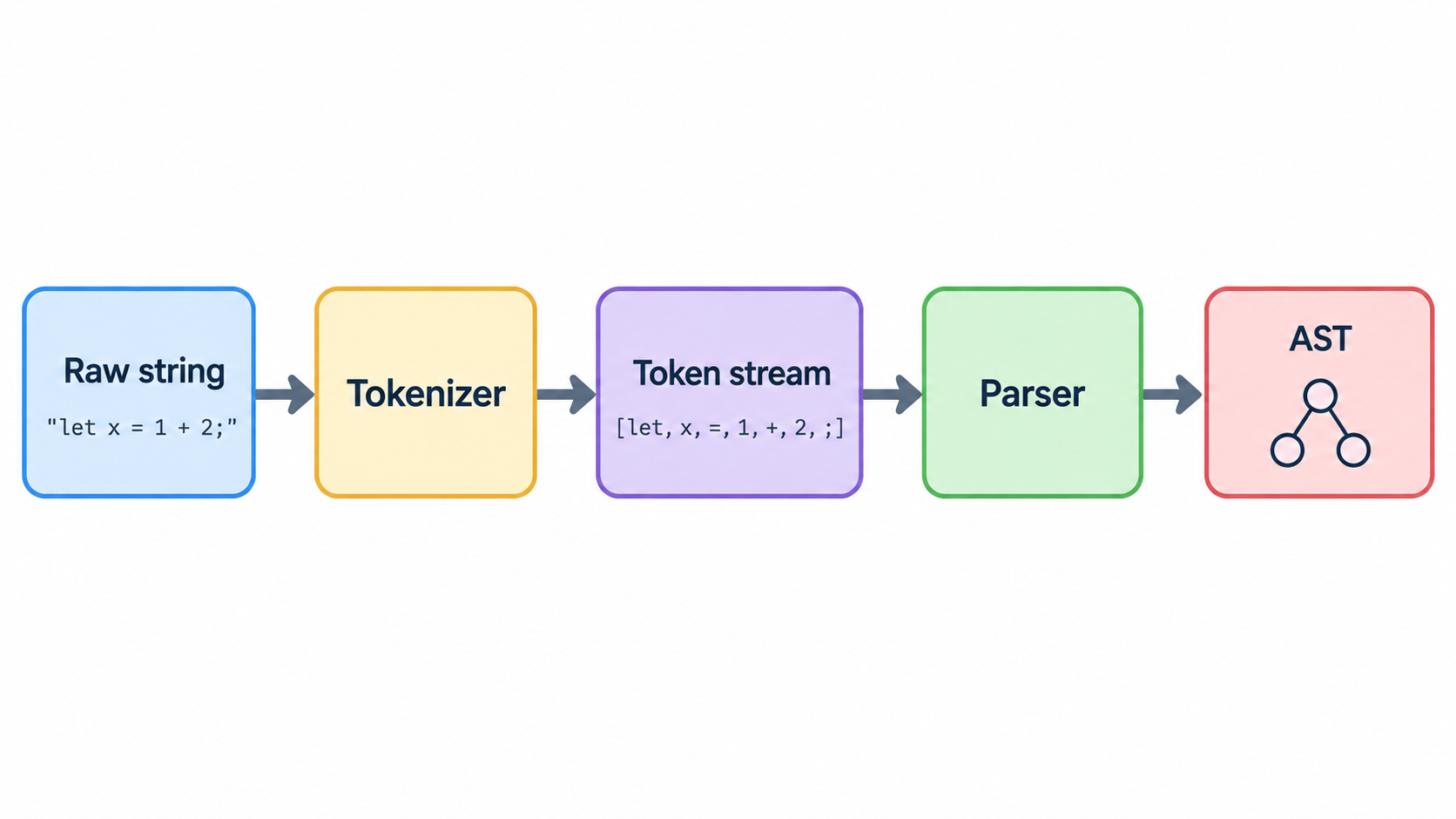
    For source code and structured text, the pipeline runs: raw string → scanner → token stream → parser → AST. The token parser is the stage that decides where one unit ends and the next begins, and every stage after it inherits those decisions.

    Lexical pipeline from raw string to AST

    Define the token record first. A workable minimum has four fields: an enum type, the raw lexeme, an optional interpreted value (a parsed number, an unescaped string), and a line/column position for diagnostics. Skipping the position field is the most common shortcut and the one that hurts most later — error messages without positions are close to useless.

    Three implementation rules prevent most tokenizer bugs:

    1. Maximal munch. Always take the longest valid match at the current position, so == is one token rather than two =.
    2. Order rules so keywords precede identifiers. If identifiers are matched first, while becomes an identifier and the keyword rule never fires.
    3. Decide explicitly about whitespace and comments. Either emit them as token kinds or skip them deliberately — but make it a documented decision, not an accident of the first regex that happens to match.

    A working hand-written lexer fits in roughly forty lines and covers the token kinds most languages need:

    import re
    from dataclasses import dataclass
    
    @dataclass
    class Token:
        type: str
        lexeme: str
        value: object = None
        line: int = 1
        col: int = 1
    
    # Order matters: keywords before identifiers, longest operators first.
    RULES = [
        ("NUMBER", r"\d+(\.\d+)?"),
        ("IDENT",  r"[A-Za-z_]\w*"),
        ("STRING", r'"(?:[^"\\]|\\.)*"'),
        ("OP",     r"==|!=|<=|>=|&&|\|\||[-+*/=<>(){},;]"),
    ]
    KEYWORDS = {"if", "else", "while", "return"}
    SKIP = re.compile(r"[ \t\r]+")
    
    def tokenize(src: str) -> list[Token]:
        tokens, i, line, line_start = [], 0, 1, 0
        while i < len(src):
            if src[i] == "\n":
                line, i, line_start = line + 1, i + 1, i
                continue
            m = SKIP.match(src, i)
            if m:
                i = m.end()
                continue
            for kind, pattern in RULES:
                m = re.compile(pattern).match(src, i)
                if not m:
                    continue
                lexeme = m.group(0)
                if kind == "IDENT" and lexeme in KEYWORDS:
                    kind = "KEYWORD"
                value = None
                if kind == "NUMBER":
                    value = float(lexeme) if "." in lexeme else int(lexeme)
                elif kind == "STRING":
                    value = lexeme[1:-1]
                tokens.append(Token(kind, lexeme, value, line, i - line_start + 1))
                i = m.end()
                break
            else:
                raise SyntaxError(f"unexpected character {src[i]!r} "
                                  f"at line {line}, column {i - line_start + 1}")
        tokens.append(Token("EOF", "", None, line, i - line_start + 1))
        return tokens
    
    if __name__ == "__main__":
        for t in tokenize('total = price * 2; if total > 100 { return "big"; }'):
            print(f"{t.type:<8} {t.lexeme!r:<12} {t.value!r:<8} {t.line}:{t.col}")
    

    Printing the token dump isn’t decoration. The dump is what you compare against when a grammar change produces unexpected behavior, and it separates “the lexer is wrong” from “the parser is wrong” in seconds instead of hours.

    Maximal munch, rule order and keyword ambiguity

    Maximal munch and rule order are the same problem looked at from two angles. A rule set that matches = before == produces two EQ tokens where one EQEQ was intended, and the parser downstream reports a confusing error two stages away from the cause. Sorting operator alternatives longest-first, and keywords before identifiers, eliminates both classes of bug without any lookahead machinery.

    Keyword ambiguity needs an explicit decision. Most languages treat keywords as reserved: the lexer recognizes if as a keyword in every position, so a variable named if is a syntax error rather than an identifier. Languages that allow contextual keywords push the decision into the parser instead. Either choice works; leaving it undecided gives you a lexer whose behavior depends on which rule happened to be listed first.

    Does tokenization change parser accuracy? Evidence from a 2026 study

    Tokenization quality isn’t cosmetic, and there’s now published evidence for that. Shamaeva and Loukachevitch (2026), in Pattern Recognition and Image Analysis, Vol. 36, pp. 486–497 (DOI 10.1134/S105466182670029X), compared two ways of evaluating a syntactic parser: with its built-in tokenizer, and with a tokenizer that returns gold markup. For a significant number of sentences, the built-in tokenization differed from the gold one, and average UAS and LAS scores were higher when the parser was evaluated with gold markup — some metrics by 0.05 or more.

    The study covers Russian-language corpora (SynTagRus, GSD, PUD, Taiga, and Poetry) and the parsers UDPipe, Stanza, Natasha, DeepPavlov, and spaCy, as they existed for this 2026 research. Those are the versions studied — not a claim about current releases of any of those tools.

    The practical takeaway for anyone building a parser: if your accuracy numbers look wrong, test the tokenizer before you rewrite the grammar. A meaningful share of apparent parsing errors originate one stage earlier, in segmentation decisions the parser never sees.

    Parsing Template Tokens and Placeholders Safely

    A document-numbering engine is a good concrete case. The tan-erp issue #6, opened 18 September 2026, asks how IDocumentNumberGenerator should parse template strings containing nine token forms — {PREFIX}, {BRANCH}, {YYYY}, {YY}, {BBBB}, {BB}, {MM}, {DD}, and {SEQ:X} — derive a period key from them, and generate unique document numbers atomically with full unit-test coverage.

    Four design decisions follow from that framing.

    Design around a registry, not a loose regex. A table of known token names with a resolution function per token makes unknown placeholders detectable. A single permissive pattern like \{[A-Z]+\} matches anything and tells you nothing about whether the result is meaningful.

    Anchor the pattern. Match whole placeholders with anchored boundaries, and handle escaping explicitly. If a substituted value can itself contain {, an unanchored second pass will re-parse it — that’s how injection-shaped bugs get into template engines.

    Fail loudly on unknown tokens. Raising is the correct behavior. Leaving the literal {BRANCH} in the output, or dropping it, silently produces malformed or colliding identifiers, and the failure surfaces much later in a way that’s hard to trace back to the template.

    Keep atomicity outside the parser. Parse first, then generate the counter inside a single transaction. The parser can be perfectly correct and two concurrent requests can still get the same number if the sequence increment isn’t atomic.

    There’s a harder adjacent case worth flagging: languages without whitespace word boundaries. The same issue pairs the template work with Thai tokenization, because a naive split on spaces produces no segmentation at all for Thai text. That branch needs a dictionary- or rule-based tokenizer — a different algorithm from placeholder substitution, and the two shouldn’t be combined into one pass.

    Unknown placeholders should raise, not fall through

    The difference between “raise” and “fall through” is the difference between a caught error and a data-integrity incident. A fall-through leaves the literal token in a generated document number, and every request that hits the same template produces the same literal — so the collision is systematic, not random. Raising converts invisible corruption into a stack trace at the first occurrence.

    Token Parsing in a Design-Token Build Pipeline

    A design-token parser reads generated platform artifacts — SCSS declarations, var() references, Kotlin token files — rather than a hand-maintained source file. That changes the risk profile: the input is machine-written, verbose, and changes shape whenever the upstream generator changes.

    The slint issue #3, opened 27 September 2026, documents the parsing contract for a Material 3 Expressive token pipeline. The source is Compose material3’s generated token files in androidx/androidx, pinned to commit 23327507f7fc7d5b19d65fec4b090f60c970079b (androidx-main, 2026-09-27), whose files carry the header // VERSION: 14_1_0. Since 2026-08-05 those files use inline value classes, so token values sit on get() = lines — a parser written for the older file shape silently reads nothing and reports no error.

    Three rules from that contract transfer to any design-token pipeline:

    1. Fail loudly on any token that cannot be parsed or mapped. Never silently drop or default a value. A dropped token becomes a component that renders with the wrong color, discovered by a designer rather than by CI.
    2. Reproduce committed output byte for byte in CI from the pinned commit. The generator runs on a clean checkout with one documented command, and the check passes only when the output is identical.
    3. Treat a version-pin bump as a deliberate, reviewed change. The pin is recorded in one place and printed into generated file headers, so bumping it is an explicit diff rather than an incidental drift.

    The referenced pipeline also resolves references between token files — a button token pointing at ShapeKeyTokens.CornerMedium, which points at ShapeTokens.CornerMedium — so the parser needs a typed intermediate model, not a flat name/value map.

    Why the pinned commit and the date are the parsing contract

    A design-token parser is only correct relative to a specific input. The same file path yields different values at different commits, and the file format itself changed on 2026-08-05. Recording 23327507f7fc7d5b19d65fec4b090f60c970079b and // VERSION: 14_1_0 in one place turns “the parser is broken” into “the pin moved and the diff is these lines.” Without the pin, a format change and a parser bug look identical from the outside.

    Build the Token Sets Once: Parsing Performance and Duplication Risk

    Token sets, DFAs, and grammar patterns should be constructed once and held on the parser instance. Rebuilding them at every call site is a performance problem, and duplicated parsers are a correctness problem that costs more than the performance one.

    The measured cost of getting the performance case wrong comes from the hefermotor issue #22, opened 19 September 2026. The _TokenSets primitive built an array literal on every method call, and the grammar called those methods at roughly 35 test sites. For the three largest sets — expr_start with 40 tokens, called at every call expression, plus case_pattern_start and type_start — building per call added 10–15% to the sum of Parse.tree over the standard library’s files in a debug build. Moving those three to fields on _Parser removed the overhead. The remaining, smaller sets were not measured.

    The correctness case comes from the plus-uno issue #622, from the 2026-09-18 architecture review. The docs token-literal check carried a parallel implementation of most of the tokens module: its own token reader, declaration regex, alias resolver with its own cycle guard, colour key, dimension key, family map, and SCSS brace parser. Removing the duplicate — tracked in PR #667 — affected 315 live token pairs that were equal before the change and unequal after. Unchanged output had been resting on no fallback literal pairing an opaque hex against a translucent token, not on any guarantee the code provided.

    That number is the argument. A duplicate parser isn’t just redundant; it’s a second set of semantics that diverges the moment either copy is edited, and the divergence stays invisible until someone enumerates it.

    Enumerate output changes instead of assuming they are absent

    The plus-uno acceptance criteria state the discipline directly: any output change is enumerated and reviewed, not assumed absent. That’s a higher bar than “tests pass,” because passing tests only prove the cases they cover. The 315-pair review is the model — the reviewer had to name the mechanism that preserved the output, not just observe that nothing appeared to break.

    The rule of thumb: one grammar module, one token registry, built once, version-pinned.

    How to Test a Token Parser: Acceptance Criteria from GitHub Tickets

    This section exists because of what the search results show about how the work is actually gated. Eight of the top ten results are GitHub issues and repositories, and five of them gate completion on tests passing or on enumerated acceptance criteria — but none presents those criteria as reusable guidance. The six criteria below are pulled from those tickets and generalized.

    1. A permanent regression test that fails without the fix and passes with it. The synchro issue #53 attaches this explicitly to the error-leak fix for audit finding C12, noting that no existing test covered the behavior. A test written after the fix that passes on the fixed code proves nothing on its own; it must be shown to fail on the unfixed code.

    2. Enumerate every output difference. The plus-uno criteria require that output changes be enumerated and reviewed rather than assumed absent. Claiming “no behavior change” without naming the mechanism is not evidence.

    3. Byte-for-byte reproduction in CI from a pinned upstream commit. The design-token pipeline’s reproducibility check is the strongest of the six because it admits no interpretation: either the generated bytes match or they do not.

    4. Fixture hygiene in the same change. When you tighten a predicate, update the success fixtures alongside it. The cortexfs fix added token_type: "Bearer" to the Codex OAuth success fixtures in the same change that required the field — otherwise the newly correct parser would have failed its own pre-existing happy-path test.

    5. Negative cases as first-class tests. Cover absent token_type, an unknown template placeholder, an unsupported token type such as mac, and a truncated Base64url segment. The cortexfs test plan adds a missing-token_type failure case to the existing hermetic OAuth regression; the synchro fix requires the defect to stop reproducing.

    6. A test for the error path itself. Assert that the client-facing error is bounded and contains no parser internals. This is the criterion that would have caught C12 before an audit did.

    Negative tests: absent fields, unknown tokens, truncated segments

    Negative cases deserve their own emphasis, because they’re where the parser’s boundaries actually live. Positive tests describe what a parser accepts; negative tests describe what it refuses, and refusal is the behavior that protects everything downstream.

    Four cases cover most of the risk surface. An absent required field — the token_type case. An unrecognized token in a registry-driven parser — the template placeholder case. A recognized-but-unsupported token — the mac case, where the field is present and well-formed but the implementation doesn’t support the semantics. And a truncated input — a Base64url segment whose padding has been stripped or whose length is wrong. Each should have a named test, and each test should assert on the specific error the caller receives, not just that an exception was raised.

    Conclusion

    A token parser isn’t one thing. It’s four different parsers sharing a name, and the format you’re decoding decides which one you need, what its output may claim, and where it has to stop.

    Name your token format first, then use the decision table to pick the branch. If it’s a JWT or OAuth token, decode it for inspection but verify the signature before you trust it, and reject a missing or unrecognized token_type instead of defaulting to Bearer. If it’s a lexical, template, or design token, define the token registry, build it once, fail loudly on anything unrecognized, and back the result with a regression test that fails without your fix.

    FAQ

    Is a token parser the same thing as a tokenizer or a lexer?

    They overlap, but they aren’t identical. A tokenizer or lexer produces the token stream; a token parser consumes tokens and gives them structural meaning. In practice, plenty of codebases use the terms interchangeably, so read the token format before assuming which one a given library means.

    Does a JWT parser verify the token’s signature?

    By default, no. Decoding reverses Base64url and deserializes JSON — nothing more. Verification requires the HMAC secret or RSA public key, and a decoded token can carry any claims its sender invented. For anything security-relevant, use libraries with signature verification explicitly enabled — the same decode-only boundary applies to any online JWT parser you use for inspection.

    Why does RFC 6749 require token_type, and is it case-sensitive?

    RFC 6749 §5.1 requires both access_token and token_type in a successful response so the client knows how to present the token. token_type is case-insensitive: Bearer, bearer, and BEARER are all valid. RFC 6749 §7.1 adds that a client must not use an access token whose type it does not understand — so reject rather than default.

    Why shouldn’t a token parser’s error message include its internal token details?

    Parser internals leak grammar rules, offsets, and token names, which hands an attacker a map of the input format. The synchro issue #53 records an audit-confirmed finding — C12, verdict CONFIRMED, severity Low — of exactly this kind of leak going out to clients. Return a bounded generic error and keep detailed diagnostics in server-side logs behind a stable correlation ID.

    Can I parse template placeholders like {BRANCH} or {SEQ:X} safely, and what about ones I don’t recognise?

    Parse against a registry of known tokens rather than a loose regex, and anchor the pattern. Raise on any unrecognized placeholder instead of leaving it in the output — silent passthrough produces duplicate or malformed identifiers. Handle escaping explicitly so injected values containing braces aren’t re-parsed on a later pass.

    Should I write my own token parser or use a library?

    Use a library when a standard defines the format — JWT and OAuth have mature, audited implementations, and hand-rolling the security path is where bugs live. Write your own when the token set is small, the grammar is yours (template placeholders, a domain-specific syntax), or you need it to fail loudly on unknown tokens in a way no general library does. Either way, build token sets once and cover the negative cases with tests.

  • JWT Parser Guide: How to Decode, Validate, and Inspect JSON Web Tokens Safely

    JWT Parser Guide: How to Decode, Validate, and Inspect JSON Web Tokens Safely

    Your authentication just broke in production. Users are getting “Invalid Token” errors, and you need to figure out why — fast. You crack open the JWT, and it looks like gibberish: three blocks of random characters separated by dots. The data is in there, but you cannot read it without a parser.

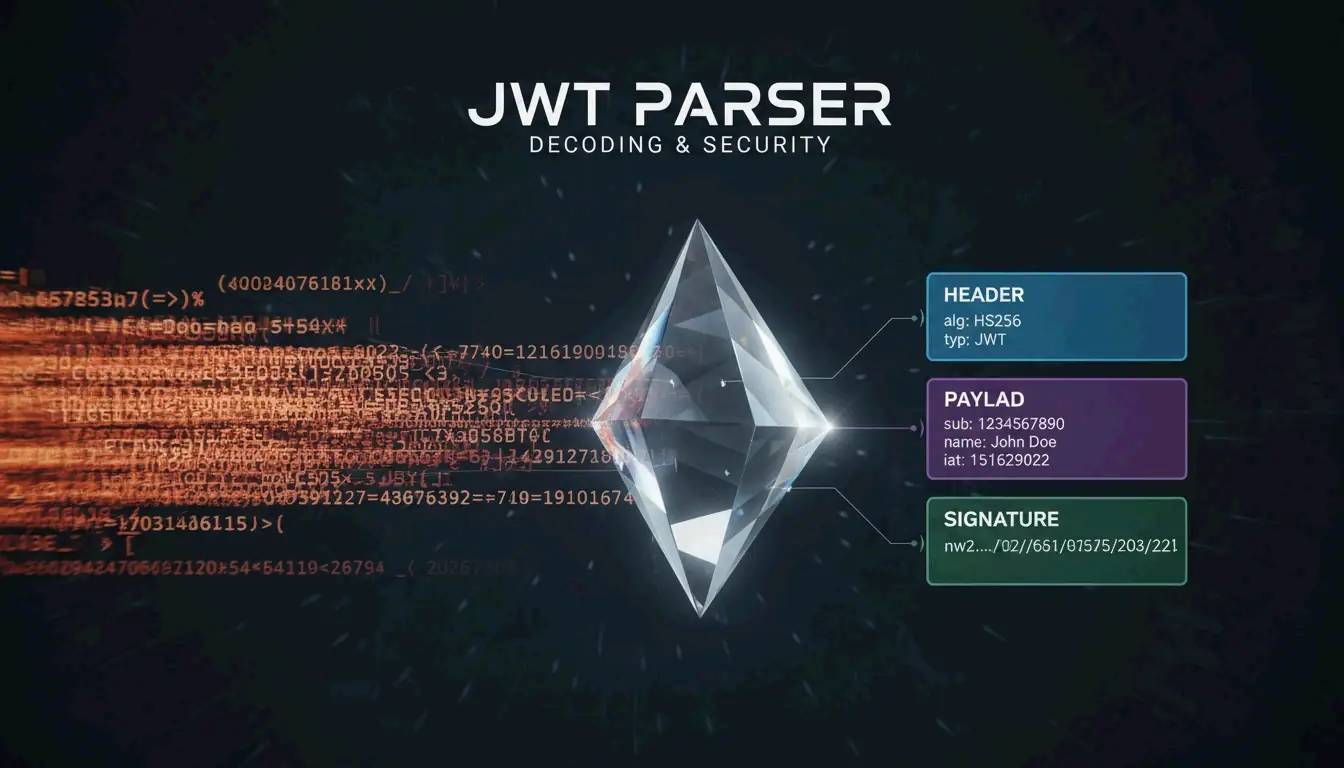
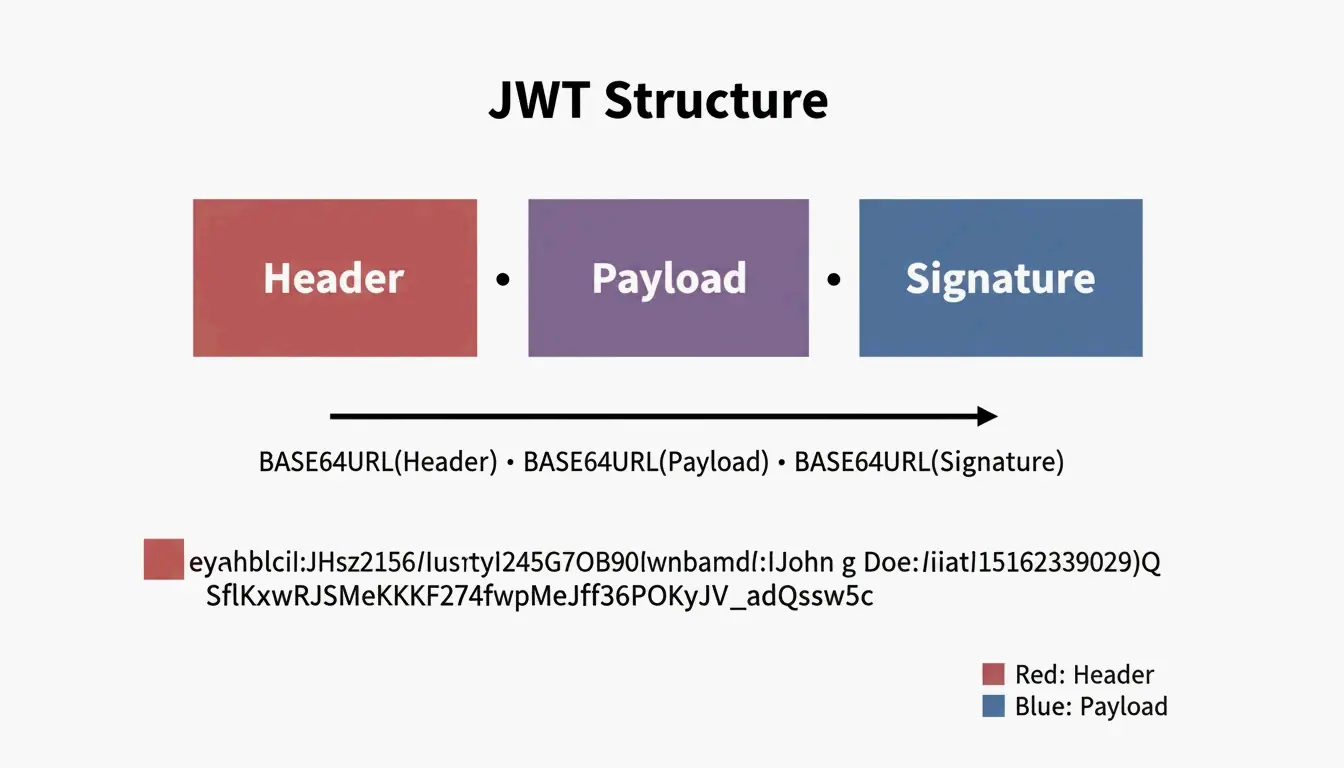
    A JWT Parser is a specialized tool that breaks down the three parts of a JSON Web Token — Header, Payload, and Signature — following the RFC 7519 standard. As of April 2026, these parsers decode Base64URL-encoded data and verify signatures using secrets or public keys to ensure the token has not been tampered with, blocking threats like the “alg: none” attack.

    What a JWT Parser Actually Does

    Think of a JWT parser as a translator. It takes a long, opaque string and turns it back into readable JSON objects. This is fundamental for managing user identities and securing data exchange in modern applications.

    Internally, the parser finds the two periods (.) that divide the token into three sections:

    Section Purpose Encoded? Readable Without Key?
    Header Metadata: signing algorithm (HS256, RS256) Base64URL Yes
    Payload Claims: user data, expiration, roles Base64URL Yes
    Signature Digital seal proving authenticity HMAC/RSA No — requires key

    Simplified 3-part structure of a JWT token

    Decoding Step-by-Step: What Happens Inside

    Let us trace through a real token. Take this example JWT:

    eyJhbGciOiJIUzI1NiIsInR5cCI6IkpXVCJ9.eyJzdWIiOiIxMjM0NTY3ODkwIiwibmFtZSI6IkpvaG4iLCJpYXQiOjE3MDAwMDAwMDB9.SflKxwRJSMeKKF2QT4fwpMeJf36POk6yJV_adQssw5c
    

    Step 1: Split on periods

    [0] eyJhbGciOiJIUzI1NiIsInR5cCI6IkpXVCJ9
    [1] eyJzdWIiOiIxMjM0NTY3ODkwIiwibmFtZSI6IkpvaG4iLCJpYXQiOjE3MDAwMDAwMDB9
    [2] SflKxwRJSMeKKF2QT4fwpMeJf36POk6yJV_adQssw5c
    

    Step 2: Base64URL-decode section [0] (Header)

    {
      "alg": "HS256",
      "typ": "JWT"
    }
    

    Step 3: Base64URL-decode section [1] (Payload)

    {
      "sub": "1234567890",
      "name": "John",
      "iat": 1700000000
    }
    

    Step 4: Verify section [2] (Signature) — requires the secret key

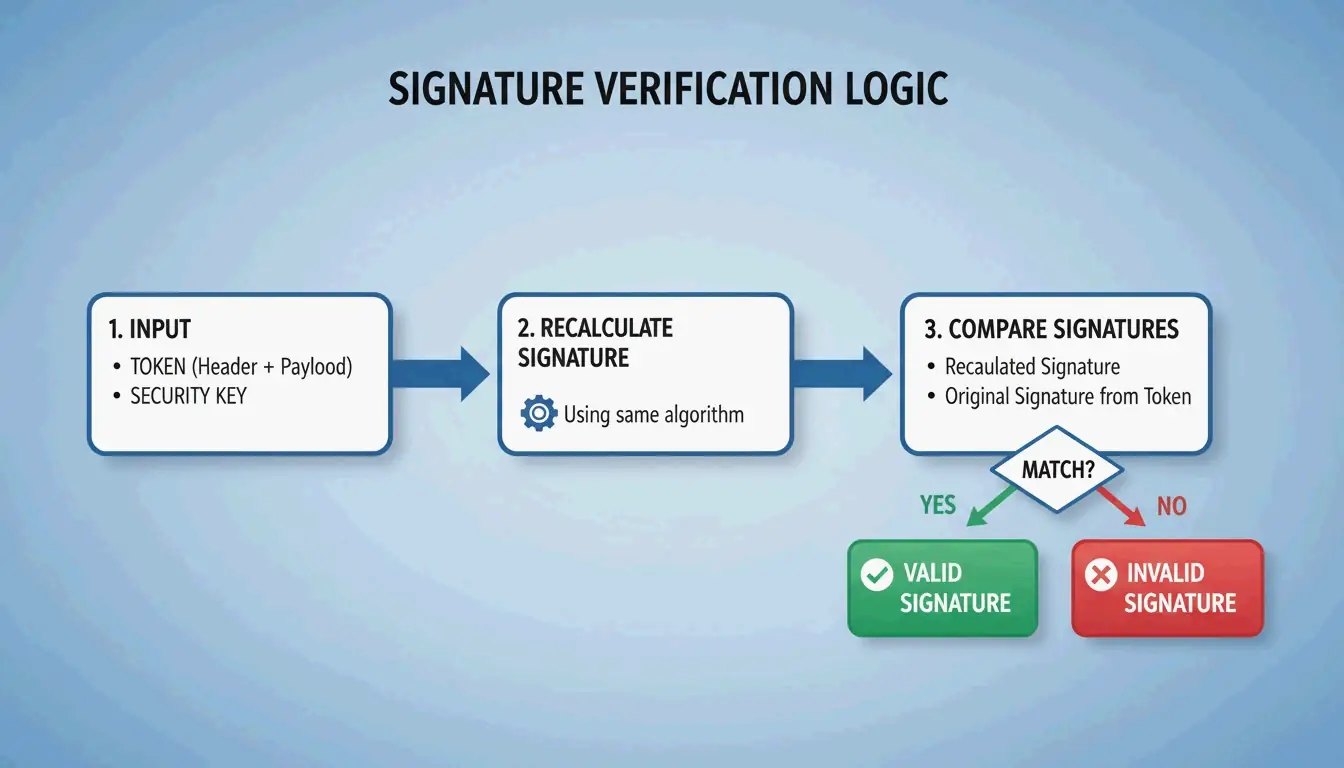
    The parser takes the Base64URL-encoded header + “.” + payload, then computes an HMAC-SHA256 using the secret. If the result matches section [2], the token is authentic.

    Critical Security Note: Base64URL Is Not Encryption

    A common trap for newer developers is assuming that the encoded header and payload are encrypted. They are not. As JustUse.me points out, Base64URL encoding just makes JSON safe to send through URLs and headers. Anyone who has the token can decode the payload without a password or key.

    Never store sensitive data (passwords, SSNs, API keys) in a JWT payload. It is visible to anyone who intercepts the token.

    Signature Verification: The Security Gate

    While anyone can read a token’s data, signature verification is what actually keeps your system secure. A JWT parser does not just read information — it proves where it came from.

    The parser recalculates the signature using the header, payload, and a key, then checks if the result matches the signature on the token. If they do not match, the token has been tampered with.

    Two Algorithm Families

    Algorithm Key Type How It Works Common Use Case
    HS256 (HMAC) Symmetric — same secret key for signing and verifying Both parties share one secret Single-service auth, microservices within one team
    RS256 (RSA) Asymmetric — private key signs, public key verifies Sender keeps private key; anyone with public key can verify OAuth2 providers, third-party API integrations
    ES256 (ECDSA) Asymmetric — same model as RSA but with elliptic curves Smaller keys, faster verification Mobile apps, performance-sensitive services

    The 3-step verification logic of a JWT parser

    The “alg: none” Attack

    This is one of the most dangerous JWT vulnerabilities. An attacker modifies the header to claim "alg": "none" and strips the signature. A poorly implemented parser might accept this, treating the token as valid without any verification.

    Defense: Your parser must explicitly reject any token where the algorithm is “none” or does not match your expected algorithm. Stas Persiianenko, who developed the Apify JWT tool, emphasizes that while tokens are transparent by design, their security depends on the parser strictly rejecting unsigned or tampered tokens.

    
    decoded = jwt.decode(token, key, algorithms=None)  # NEVER do this
    
    # SAFE: explicitly specify allowed algorithms
    decoded = jwt.decode(token, key, algorithms=["HS256"])
    

    Standard JWT Claims: What Each Field Means

    A JWT parser extracts “claims” from the payload. These follow the JOSE (JSON Object Signing and Encryption) framework for cross-system compatibility.

    Claim Full Name Purpose Example Value
    iss Issuer Who issued the token "auth.example.com"
    sub Subject The user or entity the token represents "user:12345"
    aud Audience Intended recipient of the token "api.example.com"
    exp Expiration Time When the token becomes invalid 1700000000 (Unix timestamp)
    iat Issued At When the token was created 1699999999
    nbf Not Before Token is not valid before this time 1699999999
    jti JWT ID Unique identifier for the token "a1b2c3d4"

    When using asymmetric signatures, parsers often reference a JWK (JSON Web Key) — a JSON structure representing a public key. The parser automatically fetches the correct JWK from the issuer’s metadata endpoint to verify the token.

    Implementation: Real Code for Production

    PHP with lcobucci/jwt

    The PHP ecosystem’s standard is lcobucci/jwt. Data from Packagist shows over 322 million installs as of April 2026, making it the go-to for Laravel and Symfony projects.

    use Lcobucci\JWT\Configuration;
    use Lcobucci\JWT\Signer\Hmac\Sha256;
    use Lcobucci\JWT\Signer\Key\InMemory;
    
    $config = Configuration::forSymmetricSigner(
        new Sha256(),
        InMemory::plainText('your-secret-key')
    );
    
    // Parsing and validating a token
    $token = $config->parser()->parse($jwtString);
    
    // Verify constraints: expiration, issuer, etc.
    $constraints = [
        new \Lcobucci\JWT\Validation\Constraint\IssuedBy('auth.example.com'),
        new \Lcobucci\JWT\Validation\Constraint\PermittedFor('api.example.com'),
        new \Lcobucci\JWT\Validation\Constraint\SignedWith(
            $config->signer(),
            $config->signingKey()
        ),
    ];
    
    $isValid = $config->validator()->validate($token, ...$constraints);
    

    Hono (Edge/Serverless) with Web Crypto

    For lightweight edge applications, the Hono JWT Helper provides a minimal decode() function perfect for serverless platforms where you want fast cold starts and minimal dependencies.

    import { jwt } from 'hono/jwt'
    
    // Middleware to verify JWT on every request
    app.use('/api/*', jwt({ secret: 'your-secret' }))
    
    // Access decoded claims in your handler
    app.get('/api/profile', (c) => {
      const payload = c.get('jwtPayload')
      return c.json({ user: payload.sub })
    })
    

    AI-Driven JWT Analysis with MCP

    By 2026, the Model Context Protocol (MCP) lets AI assistants like Claude Code or Cursor talk directly to JWT tools. Set up an MCP server, and a developer can ask an AI to “Check all JWTs in these logs for expiration errors” — the agent handles the parsing via the command line.

    According to Apify, bulk processing costs about $11.50 per 10,000 tokens as of 2026. This automation lets AI agents find expired tokens and immediately suggest code fixes for the app’s security settings.

    Conclusion

    A JWT parser is more than a debugging convenience — it is a vital security checkpoint. It ensures tokens are authentic through signature checks and valid through claim verification. Remember the two rules that matter most: Base64URL is not encryption, so never put secrets in the payload. And always explicitly specify allowed algorithms to prevent “alg: none” attacks.

    For production apps, use proven libraries like lcobucci/jwt or Hono’s JWT helper rather than rolling your own parser. For debugging and bulk analysis, AI-driven MCP tools are the modern approach to keeping security audits automated and thorough.

    FAQ

    Is it legal to decode a JWT token I found in my browser?

    Yes, it is entirely legal. JWTs are designed to be transparent — the header and payload are encoded for transport, not encrypted for secrecy. Possessing the token implies you have access to the data in its claims. However, always comply with local data protection laws like GDPR when tokens contain personal information.

    Why does my JWT parser show isExpired: true for a token I just generated?

    This is usually caused by clock drift between the server that generated the token and the system parsing it. If the two systems’ clocks are not synchronized (via UTC/NTP), the exp or nbf claims may appear invalid. Fix this by ensuring both systems use NTP for time synchronization, or add a small “leeway” (usually 60 seconds) in your parsing library to account for minor skews.

    Can I decode a JWT without having the secret or public key?

    Yes, you can always decode and read the Header and Payload without a key because they are simply Base64URL-encoded JSON. However, you cannot verify the Signature or trust that the data is authentic without the corresponding secret (for HS256) or public key (for RS256). Without verification, treat the data as unverified and potentially tampered with.

    What is the “alg: none” attack and how do I prevent it?

    The “alg: none” attack exploits parsers that accept the algorithm specified in the token header without validation. An attacker changes the header to "alg": "none" and removes the signature, tricking a vulnerable parser into accepting the token as valid. Prevent this by always explicitly specifying allowed algorithms in your verification code — never accept “none” or allow the token to dictate which algorithm to use.